
Annette
United States
Nov 25, 2024
5 out of 5 stars
Worked flawlessly to repair .exe files I had on an old (2005) cd. Installed and ready to use again. Very pleased!
The sequence of actions for repairing texts from an unreadable file in *.doc, *.docx, *.dot, *.dotx, *.rtf formats of any version of Microsoft Word or Rich Text:

Word Repair Toolbox helps to restore text from corrupted *.doc, *.docx, *.dot, *.dotx and *.rtf files. Word Repair Toolbox designed for recovering text from damaged Microsoft Word and Rich Text documents.
Main capabilities of the Word doc repair tool include:
Word doc repair tool read and extract text without helps of Microsoft Word. It exclude infection by VBA scripts or viruses.
Requirements
Note:
- Software cannot recover password protected or encrypted documents.
- The software team development of Word Repair Toolbox do not require donate. This application is not distributed under GNU General Public License (GPL) and similar agreements so it is not open source or free tool. Free version of specified Word Repair Toolbox is available to anyone, without some kind of limitations, get it right now and check the efficiency in your personal case.
Buying Word Repair Toolbox
For personal use for noncommercial purposes
For legal use in enterprise, commercial and governmental environments
For using on several computers of the customer (up to 100 electronic devices) in one building or distributed between several buildings
Cost of online file recovery

PayPro Global (PayPro Global, Inc., 250 The East Mall street, Etobicoke, ON Canada, M9B 0A9) is the fastest growing eCommerce company that develops customized solutions to help software producers to easily and effectively sell software online. PayPro Global supports more than one hundred currencies, all major credit cards, and a wide variety of payment options. PayPro Global offers efficient customer support 24/7 and provides personal attention to customers having special requirements.
How it Works?
Download software from website.Download
Start Install software:
Please confirm warning message.

Run installation wizard.
Run program:

Please select a damaged Microsoft Word or Rich Text file (files with *.doc, *.docx, *.dot, *dotx, *.rtf extensions) on the first page of the repair wizard in Word Repair Toolbox.

Press Analyze button.

Please confirm a start of recovery process.

The program will read and analyze a damaged file within several minutes. Later on, you will see a text that was recovered from damaged file.

Press on Start recovery button.

Select the type of recovered data:
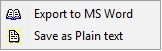
Type a file name if you selected item 11.2.

On last page shows a detailed log of recovery process.

Errors
With Word Repair Toolbox you can fix next errors:
Screenshots


Video Manual


Just loved the simple interface and its great work.
Customer's reviews and ratings


Was satisfied with everything. Thank you.